Your Pinterest Profile is Scaring People Away!
Have you ever seen someone and instantly liked what they were buying and wearing, and you think to yourself I want to be like her… only to find out that she is a hoarder and a crazy cat lady (and not the fun kind)? It makes you want to run the other way and avoid her in the future! That’s what it’s like for potential readers when your Pinterest profile is a wreck!
This is the “first impression,” the “deal sealer,” to getting new followers on your Pinterest and to your site. Whether you’re a blogger or are trying to build a brand for your own products, having a killer first impression on your Pinterest profile is the way to go!
If you’re looking to grow your business, Pinterest is the way to do it! I can say first hand that Pinterest helped me go from 100 pageviews a day to 10,000! It’s been a wild ride, but I couldn’t have done it without Pinterest!
Here’s what to do to start out. These are the very first steps in your journey from “casual pinner” to Pinterest Pro.
1. Set up your account the right way from the beginning.
- Create a Business Account. It’s not as hard as it sounds, I promise! Here are the instructions straight from Pinterest.
- Install “rich pins.” This puts your icon for your website and your site name next to the pins. Here’s the best tutorial I’ve found for the installation!
Rich pins make your pins look like this: (fancy!)

2. Make the RIGHT boards. Quality over quantity to start.
Create at least 10 boards that go along with your brand (saving money, DIY, refurbishing, essential oils, blogging, etc.). And don’t forget to make sure that your board name is SEO-friendly! Giving your board a cutesy name might be “original,” but it won’t help people find your board when they’re searching. Are people going to search for “Saving Money” or “Dollars and Cents”?
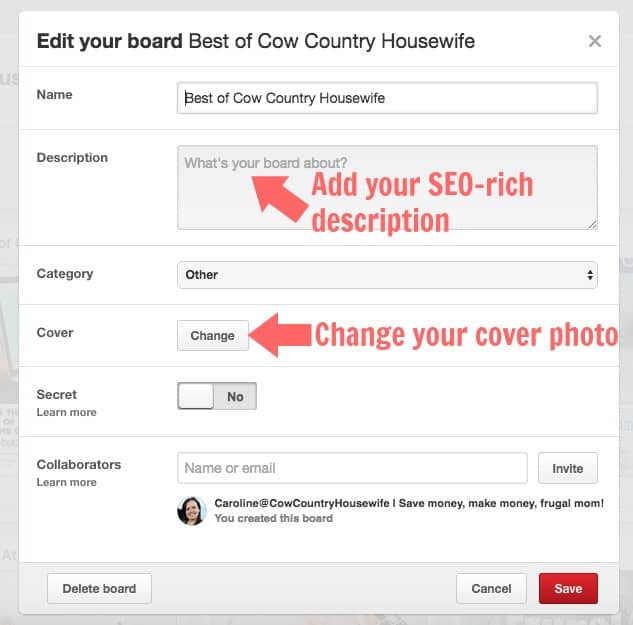
- Make board descriptions. Don’t forget to describe what your board is about. And make the description SEO-rich!
- On each new board, pin at least 10 pins to start. You’ll keep adding more over time, but this is a good start.
Bad Example:
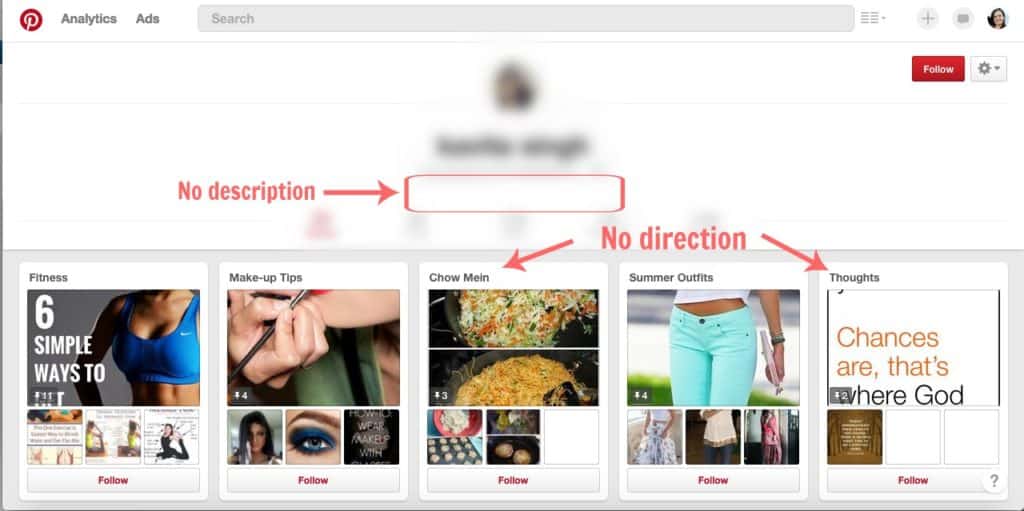
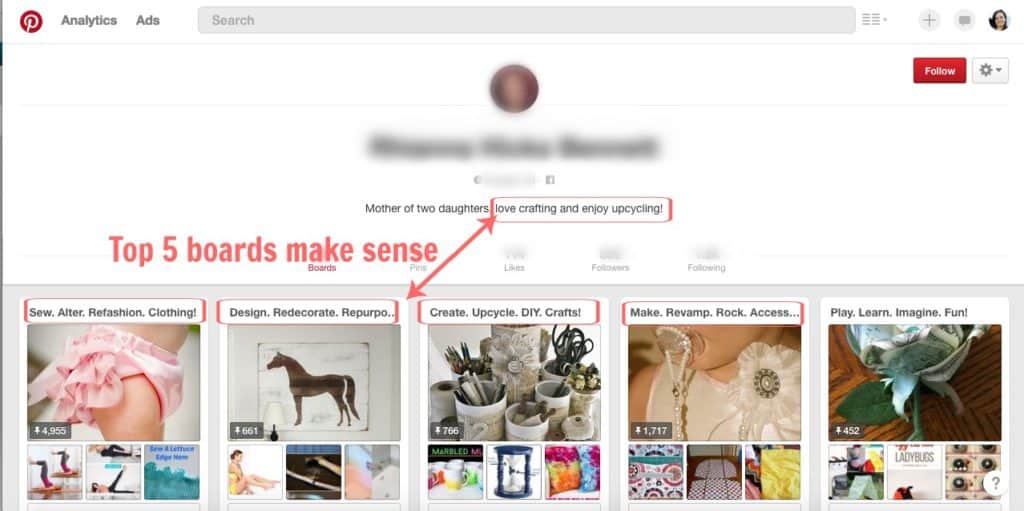
Better example of Pin Boards matching the brand and description from the Pinterest profile:
3. Optimize your Pinterest “About” Page.
- Keep it short (you only have 160 characters!) but engaging.
- What are you about?
- What is your brand?
- Be professional, but let some personality out.
- Fill in these blanks: “I help_____ do ______ by ______.”
- Make your profile picture a picture of you and not of your logo or brand.
- Link to your blog/ website, Facebook, Twitter, and anything else that you can link to Pinterest.
- Remember that your “above the fold” will make or break your Pinterest Profile.
- What can you see before you have to scroll anywhere?
- Picture, name, profile blurb, website, and the first 5 boards you have.
- What can you see before you have to scroll anywhere?
- Make your first 5 boards the best reflections of your brand!
- Make a “Best of” your blog or site and post your best content. Have that be your first board. Fill in the other 4 boards with your own 4 boards that best reflect your brand.
- You don’t want a “Halloween Ideas” board to be the first thing people see in April! Make your seasonal boards secret and add to them throughout the year, so that when the season or special occasion rolls around, you’re ready with a full board.
4. Move around the boards that you have for the most impact.
Did you know that you can move boards around your About page? It took me longer than I care to admit to realize that! All you need to do is click, drag, and drop to where you want the pins.
Put all group boards on the bottom of your boards list (this will happen automatically as you join group boards from now on). If you need some more info about group boards, check out the Ultimate Guide to Pinterest Group Boards!
5. Make your boards attractive!
Edit the covers of your boards (not the group boards!) to be attractive and eye-catching. You want clean images for board covers without text! You can do this by clicking “edit board” and then “edit cover photo”
By editing your Pinterest Profile, you will be able to maximize Pinterest to the benefit of your blog and business. This is the first impression that you get to make on Pinterest, you’ll want to make it count!
If you’re looking for more ways to make Pinterest take you to the next level, Rosemarie from The Busy Budgeter shares her Pinterest Strategy that took her from $18/month to $22,000/month!
What’s your biggest struggle with Pinterest?

Leave a Reply